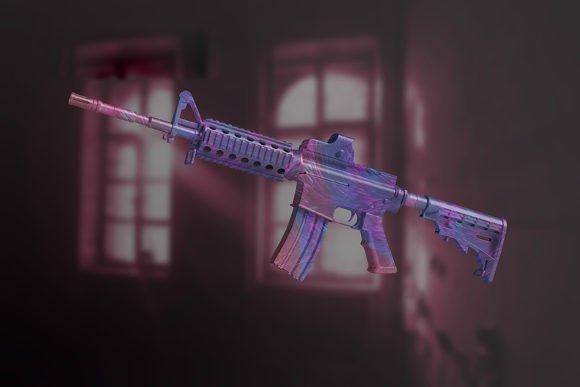
Awesome Game Weapon Skin Mockup: Showcasing Designs with Realism and Speed
If you're a game designer, digital artist, or content creator working in the gaming industry, you know how important it is to present your weapon skin designs in the most realistic and visually appealing way possible. That’s where the Awesome Game Weapon Skin Mockup comes in. This Photoshop-based tool allows you to showcase your creative work in high-quality, lifelike settings without needing advanced 3D rendering skills. Whether you're pitching to clients, building a portfolio, or preparing assets for a marketplace, this mockup gives you a fast, efficient way to visualize your designs in action.
How It Works and Why It Matters
The Awesome Game Weapon Skin Mockup uses Photoshop’s smart-object feature, which means you can swap out your design in just a few clicks. No need to manually adjust shadows, textures, or angles — everything updates automatically to reflect your new skin. The file comes at a resolution of 3000 x 2000 pixels with 300 DPI, making it suitable for both digital and print use. You can also change the background color or make it transparent, giving you full control over the presentation.
What sets this mockup apart is its simplicity and realism. It’s not just about showing a flat image of your skin — it’s about placing it in a context that feels authentic. Whether it's a sci-fi rifle glowing under neon lights or a medieval sword resting on stone, the mockup helps your design tell a story.
Real-World Uses for Different Users
Let’s look at how different types of users can benefit from the Awesome Game Weapon Skin Mockup across various scenarios:
1. Game Artists and Designers
For game artists, especially those working independently or in small studios, time is precious. The Awesome Game Weapon Skin Mockup offers a quick way to generate professional visuals for presentations, investor pitches, or community showcases. Imagine you're designing a new skin for a popular battle royale game. Instead of spending hours building a 3D model or rendering, you can use the mockup to generate a realistic preview in minutes and share it directly with your team or community.
2. Content Creators and Streamers
Streamers and YouTubers who create custom skins or collaborate with developers can use this mockup to create promotional content. If you're doing a collab with a game studio, having a polished visual of your skin concept can help the marketing team create teasers or banners. You could even use it in a video breakdown of your creative process, showing your audience how your idea translates into an in-game appearance.
3. Freelancers and Digital Artists
If you sell skins or digital assets on platforms like Gumroad, ArtStation, or the Unity Asset Store, presentation matters. The Awesome Game Weapon Skin Mockup gives your portfolio a professional edge. Potential buyers want to see how your design looks in context, not just as a flat texture. With this mockup, you can generate multiple views and settings, helping your work stand out and convert more sales.
4. Educators and Tutors
Teaching game design or digital art? This mockup can be a useful demonstration tool. You can show students how different textures, colors, and patterns affect the final appearance of a weapon in-game. It also helps them understand the importance of presentation in creative fields — a skill that’s often overlooked but crucial when building a professional portfolio.
5. Indie Developers and Small Studios
Indie developers often wear multiple hats — designer, marketer, and sometimes even customer support. Tools like the Awesome Game Weapon Skin Mockup help streamline their workflow. Need to create a teaser image for a Kickstarter campaign or update your Steam store page with new skin visuals? This mockup gives you the flexibility to do that without hiring a 3D artist or spending time learning complex software.
What to Consider Before Using
While the Awesome Game Weapon Skin Mockup is powerful and easy to use, there are a few things to keep in mind before diving in:
- Photoshop Required: Since this is a Photoshop file, you’ll need Adobe Photoshop installed to use the smart-object feature. If you’re not familiar with Photoshop, there’s a learning curve, but the included instruction file should help you get started quickly.
- Not Separated Objects: The layers aren’t separated, which means you can’t individually tweak elements like lighting or perspective. However, for most users, this isn’t a limitation since the goal is to apply your design quickly rather than modify the scene itself.
- Background Customization: You can change the background color or make it transparent, which is great for marketing materials or portfolio use. Just make sure your exported file format supports transparency (like PNG) if you want to overlay your design on other visuals.
- No Additional Assets Included: The preview images or templates shown in promotional materials aren’t part of the download. So, what you get is the mockup file itself — no extra brushes, textures, or fonts. Make sure you have the right tools and assets ready before you start.
When to Use It (and When Not To)
The Awesome Game Weapon Skin Mockup shines in situations where speed, realism, and professionalism matter. It’s perfect for:
- Pitching skin concepts to clients or team members
- Updating your portfolio with high-quality visuals
- Creating promotional banners or social media posts
- Preparing assets for game store pages or marketplaces
- Demonstrating design choices in educational settings
However, if you need full 3D control or highly customizable environments with dynamic lighting and camera angles, you might need to look into more advanced tools. This mockup is ideal for 2D designers who want to simulate 3D realism without the complexity.
Final Thoughts
The Awesome Game Weapon Skin Mockup is more than just a design tool — it's a presentation solution that helps you bring your creative ideas to life with minimal effort. Whether you're a solo creator, part of a small team, or a professional educator, this mockup can save you time while elevating the quality of your visuals. By focusing on real-world applications and outcomes, it bridges the gap between design and presentation, making it a valuable asset for anyone working in game development or digital art.