Evaluating Guessing Game Board Canva Templates for Custom Projects
Creating customized tabletop experiences often requires a balance between creative vision and technical execution. For professionals, educators, and serious hobbyists looking to produce personalized guessing games, the Guessing Game Board Canva Templates offer a streamlined solution that bridges this gap. This digital asset is designed specifically for users who want to create their own "Guess Who" style game cards without navigating complex graphic design software or hiring a professional illustrator. By leveraging the accessibility of a free Canva account, these templates provide a structured framework for producing large character cards and board pieces efficiently.
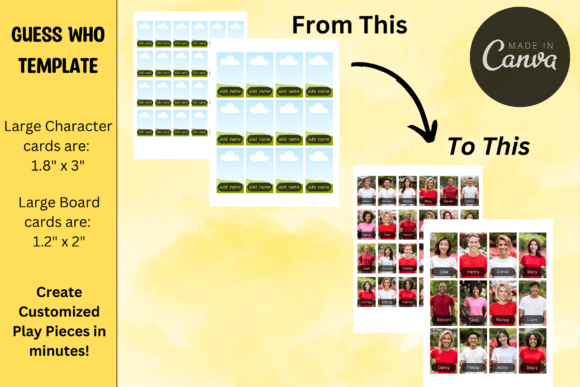
The primary value proposition of this template system lies in its specific dimensional formatting and workflow integration. Rather than starting from a blank canvas, users are provided with pre-sized layouts that correspond to standard game board specifications. The large character cards are formatted at 1.8 x 3 inches, while the large board cards measure 1.2 x 2 inches. These precise dimensions are critical for ensuring that custom-printed components fit within existing game hardware or standalone storage solutions. For marketers creating branded icebreakers, teachers developing curriculum-based review tools, or families preserving memories, this level of structural readiness significantly reduces the friction between concept and physical prototype.
Functional Design and Template Flexibility
A standout feature of the Guessing Game Board Canva Templates is the inclusion of dual layout options for every card type. Each template set provides one version with designated name tags and another without. This distinction is more than a cosmetic choice; it fundamentally alters how the game can be utilized across different contexts. The version with name tags serves traditional gameplay where identifying specific individuals or characters is the objective. Conversely, the tag-free version offers versatility for activities focusing on visual attributes, categories, or open-ended storytelling where text might distract from the learning or engagement goal.
This flexibility allows a single purchase to serve multiple functions over time. An educator might use the named version for vocabulary retention involving historical figures, then switch to the unnamed version for a lesson on descriptive adjectives or emotional recognition. Similarly, a corporate trainer could utilize named cards for team-building introductions and tag-free cards for diversity and inclusion workshops focused on breaking down stereotypes. The ability to toggle between these formats within the same editing session enhances the long-term utility of the asset, making it a practical resource rather than a single-use novelty.
Workflow Integration and Production Realities
The production workflow associated with these templates is optimized for speed and accessibility. Because the files are hosted on Canva, users can drop in their own pictures, adjust positioning, and save the final design without leaving the browser. This cloud-native approach eliminates version control issues and software compatibility headaches. For freelancers or small business owners managing multiple projects, the ability to access and edit these templates from any device ensures that game creation can fit into fragmented schedules.
However, practical evaluation requires addressing the transition from digital file to physical component. The product documentation correctly notes that pictures may need trimming based on individual printer settings and specific game board sizes. This is a common reality in desktop publishing that prospective users must anticipate. Printers often have non-printable margins, and home cutting tools vary in precision. While the template dimensions are accurate, achieving a factory-finish result requires user diligence.
- Printer Calibration: Always print a test page at 100% scale before committing to a full batch. Verify that the 1.8 x 3 and 1.2 x 2 dimensions match your physical ruler measurements.
- Paper Weight Selection: Standard copy paper is generally too flimsy for game cards. Cardstock between 65lb and 110lb is recommended to ensure the cards stand up in holders and withstand repeated handling.
- Cutting Precision: A paper trimmer or guillotine cutter yields significantly better results than scissors for maintaining the rectangular integrity required for smooth insertion into game slots.
- Image Resolution: Ensure uploaded photos are high-resolution. Images that look acceptable on screen may appear pixelated when printed at physical dimensions, reducing the perceived quality of the final game.
Audience Fit and Practical Applications
Determining whether Guessing Game Board Canva Templates align with your needs depends largely on your intended application and tolerance for manual assembly. This resource is exceptionally well-suited for professionals and creators who prioritize customization over convenience. If you require generic clip art, off-the-shelf games are sufficient. However, if the value of the activity stems from personal relevance—such as using photos of actual employees, students, family members, or specific products—this template is a necessary tool.
For educators and therapists, the template supports differentiated instruction and personalized intervention. The ability to control the visual stimuli completely allows for the creation of culturally responsive materials that reflect the specific demographics of a classroom or client base. This level of representation is rarely achievable with mass-market games.
For marketers and event planners, the template facilitates branded engagement. Custom guessing games can serve as memorable booth activations or conference swag. By incorporating brand colors and relevant imagery into the Canva design, the game becomes an extension of the marketing strategy rather than a disconnected activity. The professional presentation enabled by consistent sizing helps maintain brand integrity even in a playful context.
For serious hobbyists and gift-givers, the template elevates personal projects. Creating a bespoke game featuring inside jokes, shared memories, or niche interests demonstrates a level of thoughtfulness that generic gifts cannot match. The structured layout ensures the final product feels intentional and polished, distinguishing it from a simple photo collage.
Quality Assessment and Limitations
From a quality perspective, the templates excel in usability and consistency. The alignment guides and placeholder images reduce cognitive load during the design phase, allowing users to focus on content selection rather than pixel-pushing. The inclusion of a PDF with direct links to the Canva templates streamlines the onboarding process, removing ambiguity about where to start.
Nevertheless, potential users should recognize inherent limitations. As a digital template, the final output quality is entirely dependent on the user’s printing equipment and finishing skills. There is no quality assurance on the physical side; the template guarantees only the digital layout. Additionally, while compatible with free Canva accounts, users accustomed to premium assets may find the reliance on their own uploads restrictive if they lack a library of suitable images. The template provides the vessel, not the content.
Furthermore, the fixed dimensions (1.8 x 3 and 1.2 x 2) are optimized for specific large-format boards. Users attempting to adapt these for vintage or non-standard game frames may encounter fitment issues despite the trimming disclaimer. It is advisable to measure your target game board physically before beginning the design process to confirm compatibility.
Strategic Value for Custom Game Creation
In the landscape of DIY game creation, Guessing Game Board Canva Templates occupy a valuable niche. They solve the specific problem of formatting custom content for physical play without requiring specialized design skills. For adults aged 20–50 who value efficiency and personalization, this tool represents a practical intersection of creativity and utility.
The decision to utilize this resource should be weighed against the time investment required for printing and assembly. For those willing to engage in the finishing process, the return on investment is high: a fully customized, reusable game asset that serves educational, social, or promotional objectives. The dual name-tag functionality further extends this value, ensuring the template remains relevant across various use cases.
Ultimately, this template is best viewed as a production accelerator. It removes the technical barriers to entry for custom game design, allowing professionals, educators, and creators to channel their energy into curating meaningful content. When paired with appropriate printing materials and careful assembly, it enables the creation of personalized game board pieces in minutes that would otherwise take hours to format manually. For anyone seeking to transform digital photos into tangible interactive experiences, this Canva template provides a reliable, flexible, and professionally structured foundation.