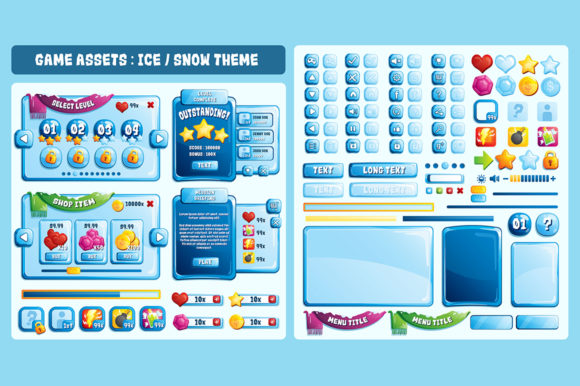
Ice Snow Game UI Assets: Vector Design for Mobile
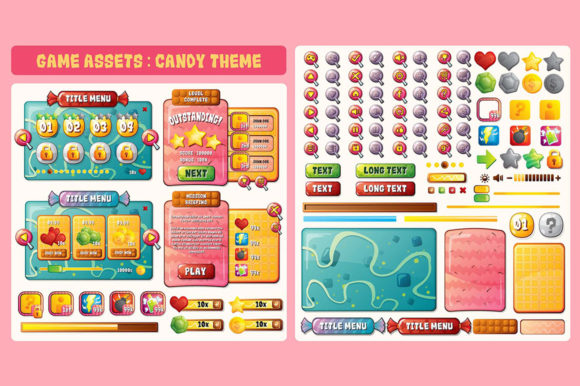
Creating a cohesive visual identity for mobile games often presents a significant challenge for independent developers and small studios. The Ice Snow Game UI Assets package addresses this bottleneck by providing a comprehensive, professional-grade interface kit designed specifically for Android and iOS development. Rather than spending weeks drawing buttons, panels, and icons from scratch, creators can leverage these pre-made elements to establish a polished winter aesthetic immediately. What sets this collection apart is its foundation in vector graphics, ensuring that the crisp, clean lines of an icy theme remain sharp regardless of the target device’s screen density or aspect ratio.
For game designers and marketers, the value lies not just in the visual style but in the technical flexibility. Because these assets are crafted in Adobe Illustrator, they are fully editable and resizable. This means you are not locked into a single color palette or shape; you can modify gradients, adjust stroke weights, and reshape containers to fit your specific gameplay mechanics. Whether you are building a casual puzzle game, an endless runner, or a narrative-driven adventure, having a malleable UI foundation allows you to maintain brand consistency while adapting to unique functional requirements.
Technical Specifications and File Formats
Understanding the contents of the asset package is crucial for integrating it smoothly into your development pipeline. The Ice Snow Game UI Assets are delivered with four distinct file types, each serving a specific purpose in the game creation workflow:
- EPS File: Encapsulated PostScript files are universally compatible with most vector editing software. If you do not have access to Adobe Illustrator, the EPS format ensures you can still open, view, and edit the assets in alternatives like CorelDRAW, Inkscape, or Affinity Designer.
- AI File: The native Adobe Illustrator source file preserves all layers, groups, and effects. This is the master file for deep customization, allowing you to toggle visibility, rename layers, and apply non-destructive edits.
- Transparent PNG File: For developers who want to skip the design phase and move straight to implementation, high-resolution transparent PNGs are included. These are ready to be imported directly into Unity, Unreal Engine, Godot, or native mobile IDEs without further processing.
- Read Me File: A vital documentation resource that outlines licensing terms, layer organization, and recommended export settings to ensure optimal performance on mobile devices.
The kit uses a reference resolution of 1920x1200. While this provides excellent detail for tablets and high-end phones, modern mobile development requires supporting multiple aspect ratios. Since the source files are vector-based, you can easily extend backgrounds or resize HUD elements to accommodate taller phone screens (such as 20:9 ratios) or wider tablet formats without experiencing pixelation or blurriness.
Creative Applications Across Genres
While the "Ice Snow" theme suggests a specific niche, the versatility of vector art allows these assets to transcend simple winter simulations. Creative professionals can reinterpret the kit to suit various genres and audiences.
Casual Puzzle and Match-3 Games
The bright, high-contrast nature of ice-themed UI works exceptionally well for casual games where readability is paramount. Buttons need to be inviting, and progress bars must be instantly recognizable. By utilizing the included panel frames and icon sets, designers can create a satisfying tactile feel. Consider adjusting the saturation of the blue tones to create a warmer, more playful atmosphere for younger audiences, or shifting toward cooler cyans and whites for a sleek, modern look aimed at adult players.
RPG and Adventure Interfaces
Role-playing games require complex inventory systems, dialogue boxes, and stat screens. The modular nature of these assets allows you to construct elaborate menus by combining simpler vector shapes. You might use the base window frames for inventory slots while repurposing decorative snowflake motifs as bullet points or separator lines. Because the files are layered, you can strip away overtly wintery decorations if your RPG takes place in a different season, retaining the structural integrity of the UI while swapping out thematic accents.
Educational and Gamified Learning
Educators and ed-tech developers often struggle to make learning apps visually engaging without being distracting. Ice and snow themes offer a neutral, calming backdrop that reduces cognitive load compared to chaotic, hyper-colored interfaces. The clean geometry of these vector assets supports accessibility standards, making them suitable for apps targeting diverse age groups or users with visual sensitivities. Customizing the text areas within the AI files allows for easy localization and font adjustments to meet specific legibility guidelines.
Adapting Resolution and Aspect Ratio
A common hurdle when using pre-made assets is resolution mismatch. The 1920x1200 baseline is robust, but mobile fragmentation demands adaptability. Here is a practical approach to resizing these vector assets effectively:
- Analyze Your Target Canvas: Before exporting, determine the primary aspect ratio of your game. If you are targeting modern smartphones, you may need a taller canvas than 16:10.
- Use Artboards Strategically: In Adobe Illustrator, set up multiple artboards representing different device sizes. Copy your UI elements across these artboards to test how they scale.
- Anchor Points Matter: When stretching a background panel, avoid scaling the entire object uniformly, which distorts corner radii. Instead, use the Direct Selection Tool to move anchor points, extending the flat areas while keeping corners perfectly round.
- Export at Multiple Densities: Mobile platforms require different texture densities (1x, 2x, 3x). Export your finalized vectors at these specific scales to ensure crisp rendering on everything from budget Android devices to Retina iPads.
If you lack vector editing skills, the transparent PNGs provide a fallback. However, raster images should always be scaled down rather than up. Use the 1920x1200 masters as your maximum size and generate smaller variants for lower-resolution targets to maintain visual fidelity.
Maintaining Visual Consistency
One of the greatest risks when using asset packs is creating a disjointed user experience where purchased elements clash with custom additions. To keep your Ice Snow Game UI Assets feeling organic and original, establish a strict style guide before beginning production.
Sample colors directly from the provided vector files to build your global palette. Note the specific gradient stops, shadow opacities, and highlight angles used in the original designs. When you create new icons or screens, replicate these exact values. Consistency in lighting direction is particularly important; if the original buttons have a top-left highlight, every new element must follow that same light source to avoid breaking immersion.
Typography also plays a critical role. Choose fonts that complement the geometric precision of the ice theme. Rounded sans-serifs often pair well with soft snow aesthetics, while sharper, angular typefaces reinforce the crystalline quality of ice. Ensure your text remains legible against the potentially complex backgrounds of the UI panels by testing contrast ratios early in the design process.
Practical Workflow Recommendations
Integrating this asset pack efficiently requires treating it as a starting point rather than a final product. Freelancers and studio teams should organize the source files logically upon receipt. Rename layers to match your project’s naming conventions and group related elements together. This upfront organization saves hours of frustration during crunch periods when you need to quickly locate a specific button state or dialog frame.
Consider creating a master UI prefab or template within your game engine using the exported assets. This ensures that any future updates to the visual style propagate automatically throughout the game. For entrepreneurs and publishers managing multiple titles, this kit can serve as a branded template, allowing for rapid prototyping and consistent quality across a portfolio of winter-themed releases.
Ultimately, the Ice Snow Game UI Assets represent a balance between convenience and creative control. They remove the tedious labor of drafting basic interface geometry while preserving the artistic freedom necessary to build something unique. By leveraging the power of editable vectors and understanding the technical nuances of mobile resolution, developers can transform a standard asset pack into a distinctive, professional-grade user experience that resonates with players and stands out in a crowded marketplace.