Sugar Candy Game UI Assets: Integrating Vector Graphics into Mobile Development Workflows
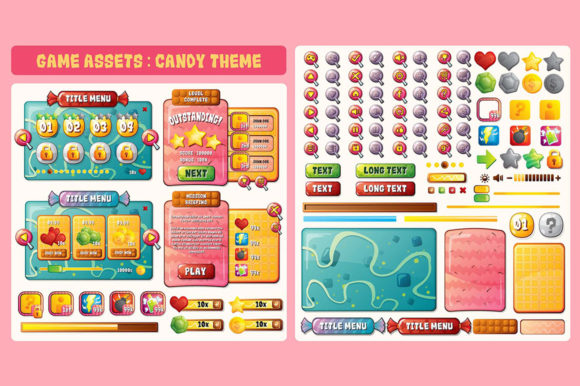
For game developers and designers targeting the Android and iOS markets, visual consistency is often the bottleneck in production. The Sugar Candy Game UI Assets package serves as a specialized resource designed to bridge the gap between conceptual art and functional interface design. Rather than treating these graphics as static images, professionals should approach this asset pack as a foundational design system. Because the kit is constructed using Adobe Illustrator, it offers a level of flexibility that raster-based alternatives cannot match. This vector-native architecture allows teams to maintain crisp visuals across the fragmented screen sizes typical of modern mobile devices while significantly reducing the time spent on manual redrawing or upscaling.
In the broader context of game development, user interface assets are not merely decorative; they are critical navigation tools that dictate player retention and usability. The Sugar Candy theme specifically targets the casual gaming demographic, requiring a balance of vibrancy and clarity. By utilizing pre-made, editable vectors, developers can bypass the initial sketching phase and move directly into implementation and iteration. This shifts the workflow from creation to customization, allowing more resources to be allocated toward gameplay mechanics and user experience testing rather than pixel-pushing.
Leveraging Vector Formats for Cross-Platform Compatibility
The primary advantage of this asset kit lies in its file structure. The inclusion of EPS and AI files ensures that the source material remains resolution-independent. For developers building for both iOS and Android, this is a logistical necessity. Mobile ecosystems demand multiple asset densities (1x, 2x, 3x) to accommodate everything from budget smartphones to high-end tablets. With raster-only assets, creating these variations often results in quality loss or blurriness. With the Sugar Candy Game UI Assets, you can export exact dimensions required by Xcode or Android Studio directly from the source file without degradation.
The transparent PNG files included in the package serve a different purpose in the workflow. These are best utilized for rapid prototyping or when working within game engines like Unity or Godot where immediate visual feedback is necessary before finalizing vector exports. Having both formats available allows for a hybrid workflow: use PNGs for grey-box testing and layout validation, then swap in high-resolution vector renders for the final build. This dual-format approach prevents the common pitfall of committing to high-fidelity assets too early in the design process, saving time if layout changes are required during playtesting.
Managing Resolution References and Scaling
It is important to note that this game kit uses a 1920x1200 resolution reference. While vector graphics are theoretically infinite, the composition and anchor points were established at this specific dimension. When integrating these assets into projects with different aspect ratios or base resolutions, a deliberate adjustment phase is required. You cannot simply drag and drop the master file into a 1080x1920 portrait project and expect perfect alignment.
Practical implementation requires opening the AI or EPS file in Adobe Illustrator to adjust the artboard and reposition elements relative to the new canvas size. This is not a limitation but a standard part of professional asset integration. Developers should create a master template file based on their target device profile first. Import the Sugar Candy assets into this template, then scale and reposition components as a group to maintain proportional relationships. If your engine supports dynamic UI scaling, render the assets at a higher baseline resolution to ensure sharpness on retina displays, then let the engine handle the downscaling. Manual rendering via an image editor may be necessary for complex compositions where automatic scaling distorts stroke weights or text legibility.
Customization and Brand Identity Integration
Using stock assets does not mean sacrificing unique brand identity. The editable nature of the Sugar Candy Game UI Assets allows for deep customization that aligns the interface with your specific game’s narrative and color palette. Before importing assets into your game engine, establish a global color swatch library in Illustrator. Replace the default candy colors with your project’s specific hex codes. Because the assets are vector-based, changing a global swatch updates every button, panel, and icon instantly. This ensures visual coherence across hundreds of UI elements without manual recoloring.
Beyond color, consider modifying shapes to match your game's typography and character art. If your game features rounded, soft characters, soften the corners of the UI panels. If the aesthetic is more geometric, sharpen the edges. The Read Me file included in the package provides essential guidance on layer organization and naming conventions. Adhering to these guidelines is crucial when modifying the assets, as it preserves the logical structure needed for future updates or team collaboration. Disorganized layers in a modified vector file can turn a simple update into a hours-long troubleshooting session.
Workflow Integration with Game Engines
The transition from Adobe Illustrator to a game engine requires a standardized export pipeline. Establish a naming convention that matches your engine’s resource loading system before exporting. For example, if Unity expects btn_play_normal.png, name your Illustrator layers and export presets accordingly. Automating this export process using Illustrator scripts or actions can drastically reduce human error and speed up the iteration cycle when tweaking UI based on QA feedback.
When implementing these assets in Android or iOS environments, consider the interaction states. The Sugar Candy Game UI Assets provide the visual foundation, but developers must define how these assets respond to touch. Create separate exports for pressed, disabled, and hover states if they are not included in the base pack. Since you have the source vector files, creating these variants is a matter of adjusting opacity, brightness, or scale within Illustrator and batch-exporting. This proactive preparation prevents the need to return to the design tool mid-development when a programmer realizes a button state is missing.
Quality Control and Long-Term Asset Maintenance
Professional asset management extends beyond the initial purchase. The Read Me file serves as the documentation for your design system. Keep this file accessible in your project repository alongside the asset folders. It contains vital information about the original designer’s intent, font dependencies, and licensing restrictions. Ignoring this documentation often leads to broken links or missing fonts when another team member opens the file months later.
Quality control for UI assets involves testing on actual hardware, not just in the editor. A button that looks appropriately sized on a 27-inch monitor may be unclickable on a compact smartphone screen. Use the Sugar Candy Game UI Assets as a starting point, but validate touch targets against platform-specific human interface guidelines. Apple and Google both publish minimum touch target sizes (typically 44pt and 48dp respectively). Because these assets are resizable vectors, adjusting a button to meet accessibility standards is trivial compared to resizing a flattened image. Make these adjustments early in the production cycle to avoid costly rework during the polish phase.
Finally, consider the longevity of the asset pack. Games are live services that require updates, seasonal events, and expansions. Maintaining a clean, organized master file for the Sugar Candy Game UI Assets ensures that you can generate new content years after the initial release. Archive the original, unmodified files separately from your working project files. This version control practice protects against accidental corruption and provides a reliable fallback if customization experiments fail. By treating this asset pack as a living design system rather than a disposable resource, developers maximize their return on investment and maintain visual consistency throughout the product lifecycle.
Optimizing File Size and Performance
While vectors are excellent for design, mobile games require optimized raster outputs for performance. Exporting UI assets at unnecessarily high resolutions increases app download size and memory usage. Determine the maximum display density you intend to support and cap your export resolution accordingly. For most mobile titles, 2x or 3x density is sufficient. Utilize texture atlases or sprite sheets when possible to reduce draw calls. The modular nature of the Sugar Candy Game UI Assets makes them ideal for packing into atlases. Group related UI elements logically during the export phase to facilitate efficient atlas generation. This technical consideration bridges the gap between beautiful design and smooth runtime performance, ensuring the sweet aesthetic does not come at the cost of frame rate.